Real projects

Case studies

For clarity, we group case studies of all clients under the letter A.

A

Letter A

An overview of clients and projects grouped under the same letter of the alphabet.

Case study 1

Digitizing a law firm: from email and remote desktop to a clear Microsoft 365 setup
Digitizing a law firm: from email and remote desktop to a clear Microsoft 365 setup

The law firm worked via remote desktop, WhatsApp, and forwarded emails. Documents were physically tied to one office computer. Today each client has their own workspace in Microsoft 365 and the lawyer can access everything from anywhere.

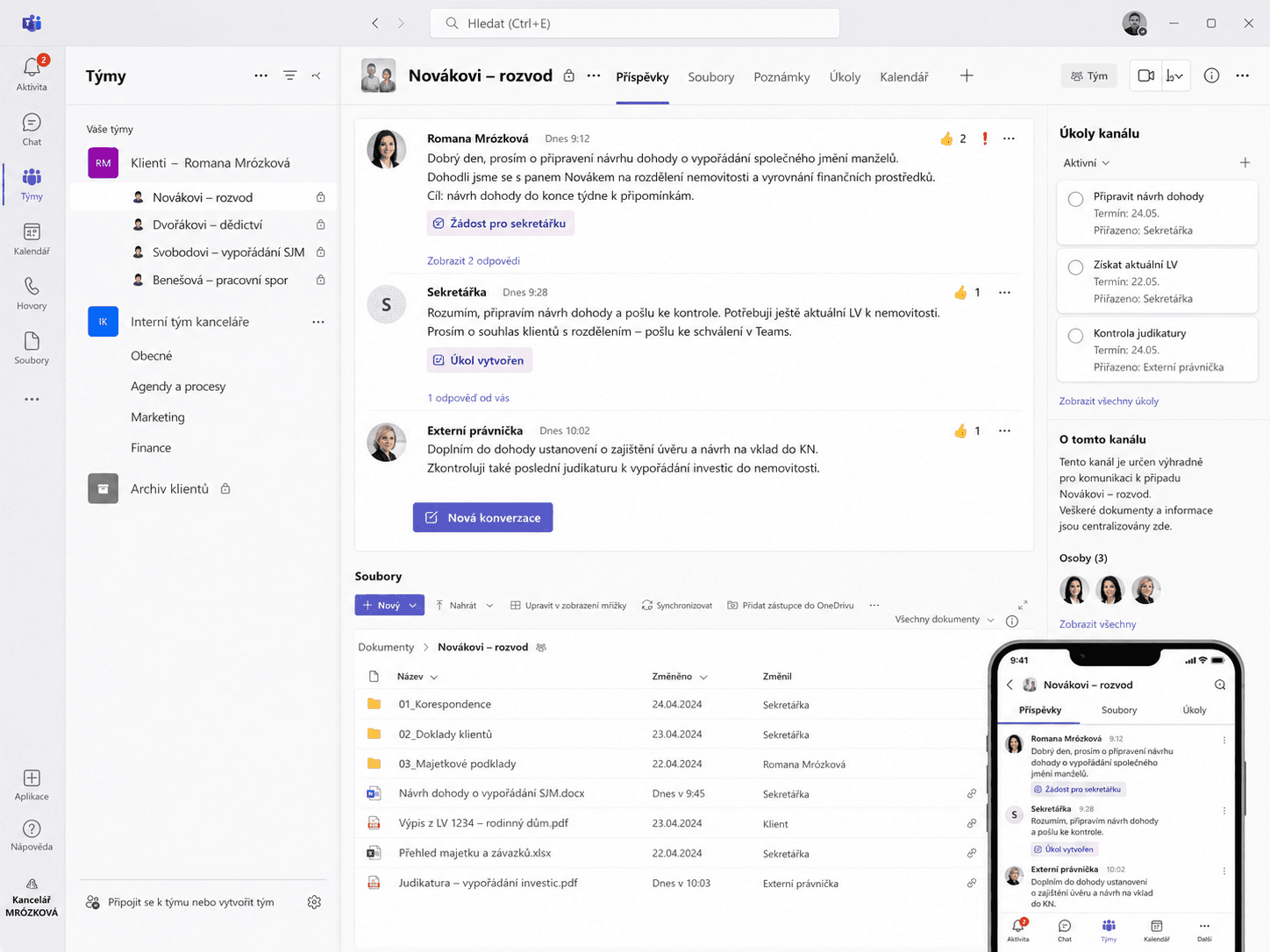
"I can now see exactly which tasks I assigned to my secretary and which she then completed. I can also work from anywhere, and most importantly I have access from my phone." — Mgr. Romana Mrózková

Starting point

Files stored locally, access via remote desktop, communication split between email and WhatsApp. It was never immediately clear what was done, what was in progress, or where the latest document version lived. Scanning meant emailing a file and then manually filing it — too many steps.

What we changed

We moved the firm into Microsoft 365 around one principle: each client has their own workspace in Microsoft Teams and SharePoint. Tasks for the secretary are assigned directly in Teams on the relevant matter — both sides can trace what was requested and when. Documents can be scanned straight into the correct client folder via OneDrive. An external lawyer can be added with one click and immediately sees everything she should. We also introduced practical AI tools (NotebookLM, Gemini Deep Research) to speed up work with judgments and legal materials.

Outcome

  • documents available securely from anywhere
  • each client has their own space in Teams and SharePoint
  • communication and tasks tied directly to the matter
  • document scans saved straight to the correct folder
  • less forwarding, less searching, less manual administration

Tools used: Microsoft 365, Microsoft Teams, SharePoint, OneDrive, NotebookLM, Gemini Deep Research
Case study 2

Account Professional a.s. — long-term cooperation

Account Professional a.s. is an accounting firm processing payroll, invoicing, and accounting for more than 500 companies. As part of long-term cooperation we built several solutions — from simple desktop tools through RPA automation to a custom AI assistant in Outlook. Each project below addresses a different everyday problem from accounting firm life.

Email assistant in Outlook over a proprietary knowledge base

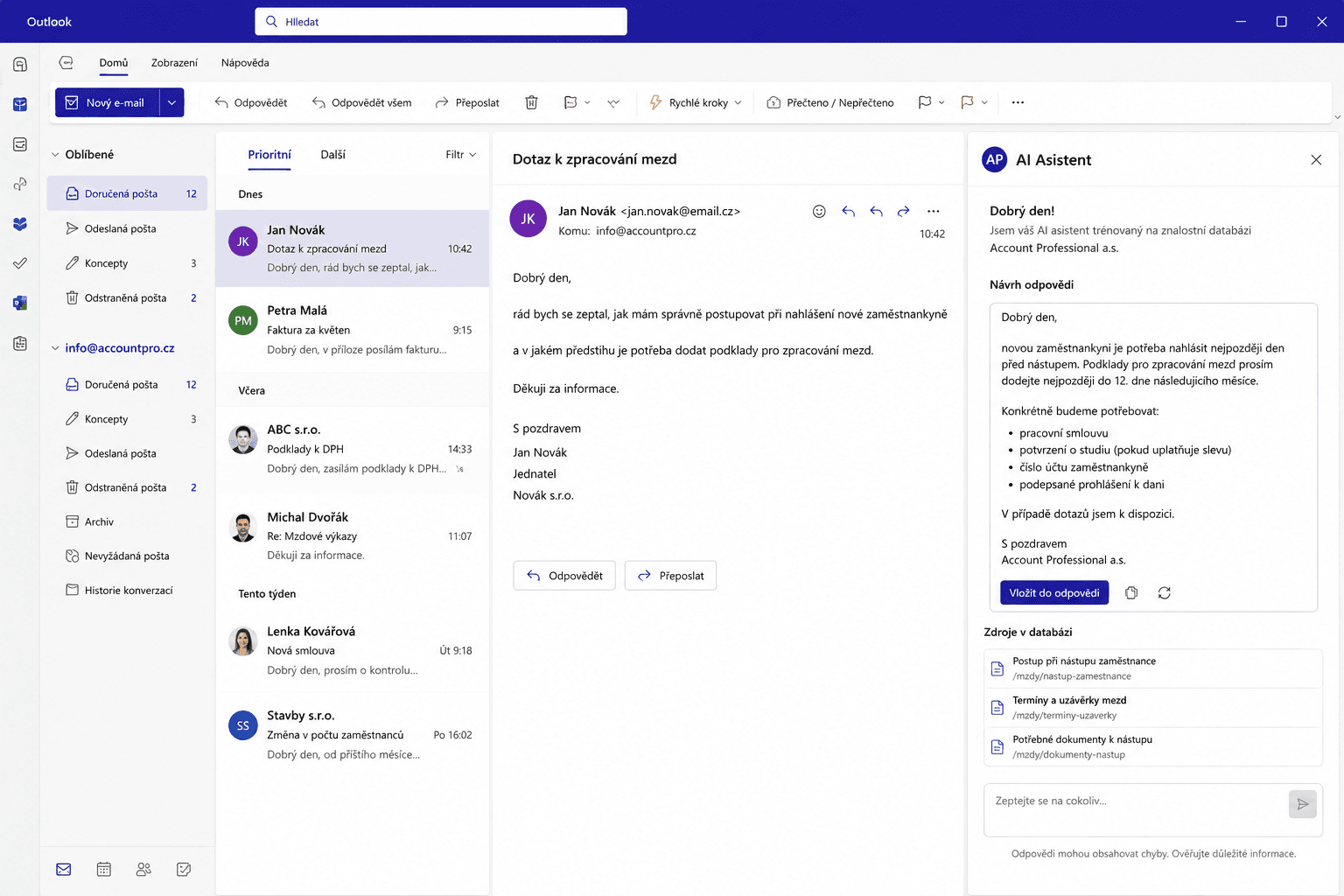
A generic AI tool is not enough — corporate email replies must draw on specific offers, calculations, and how that company communicates. For Account Professional we built a custom assistant directly in Outlook that pulls from the firm's knowledge base, not from the internet.

"The email assistant works better than Microsoft's Copilot." — Account Professional a.s.

Starting point: Some replies repeat, but they are never identical — they depend on client context, prior quotes, and internal materials. A standard AI assistant writes a generic email; for corporate communication that is not enough.

What we built: A custom email assistant in Outlook built on RAG — AI first retrieves relevant information from the firm's knowledge base (past replies, price quotes, calculations stored in Azure Blob Storage) and only then drafts a reply. The user stays in Outlook, can add their own instructions, and inserts the draft into the reply with one click.

Outcome: Faster preparation of client communication, more consistent reply style, and drafts grounded in the firm's real know-how — not a generic model.

Tools used: Azure Blob Storage, Azure AI Search, Azure Vectorizers, Outlook add-in, RAG architecture

Automation of monthly payroll processing

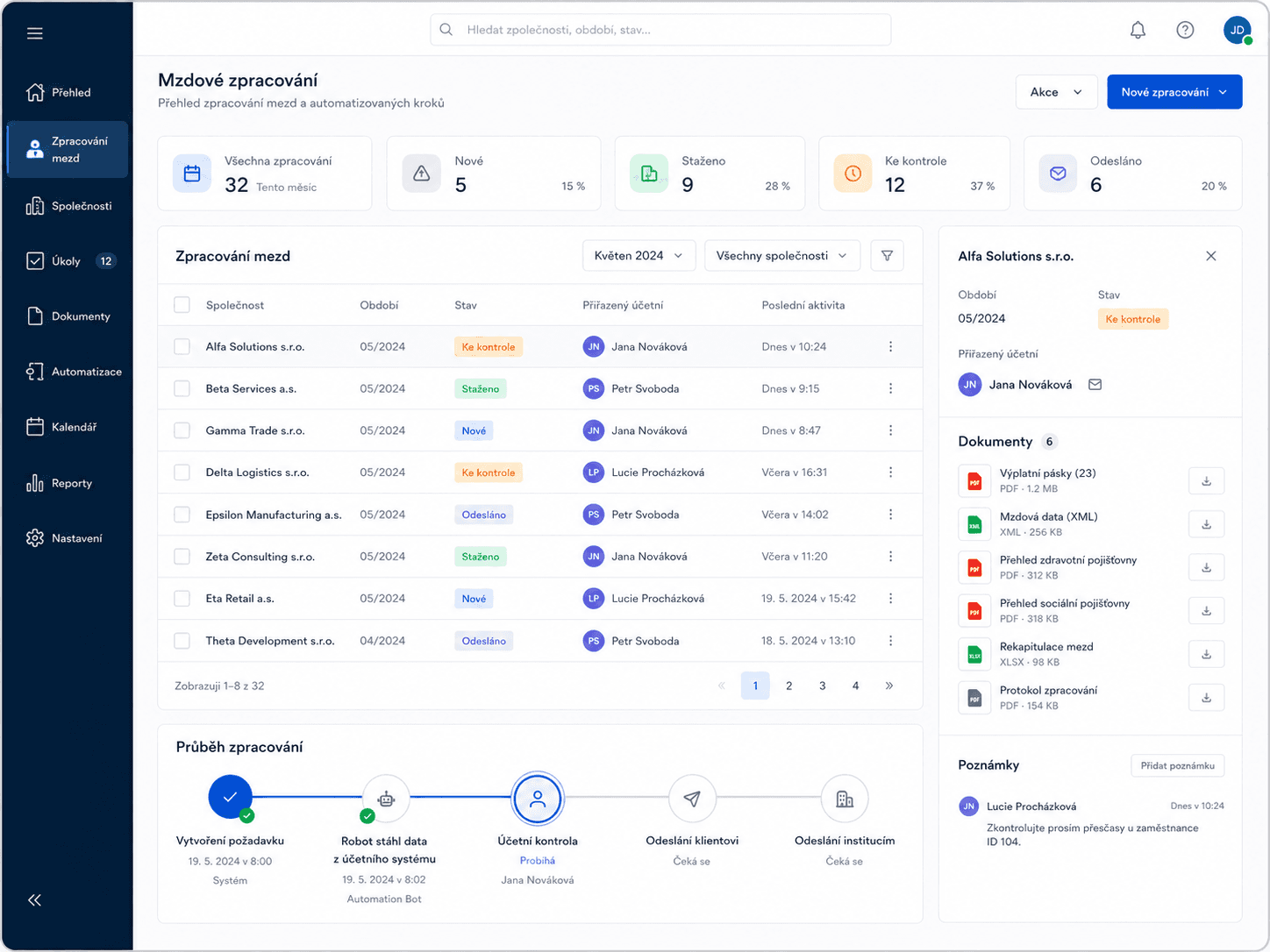
Every month the same steps: download documents from the accounting system, save them, send to clients, send to authorities. Accountants did all of this manually — that is exactly what we automated.

"Payroll automation saves each accountant 3 hours of work every month. Multiplied by twenty employees — that's tangible help." — Account Professional a.s.

Starting point: After payroll calculations finished, the same routine repeated each month in Premier — downloading payslips, health insurer and social security reports, manual saving, emailing clients, sending Data Box messages to authorities.

What we built: Automation built on Microsoft Power Platform. The accountant selects the company and period in an app inside Teams — the rest is handled by Power Automate Cloud and Power Automate Desktop acting as an RPA robot that drives Premier like a human. The accountant stays at the control point: she reviews the downloaded documents and only after confirmation does automation proceed — saving to SharePoint, emailing the client, sending official messages to institutions.

Outcome: 3 hours saved per accountant per month, a uniform procedure, lower risk of a missed step, full process visibility in Teams.

Tools used: Microsoft Dataverse, model-driven app, Microsoft Teams, Power Automate Cloud, Power Automate Desktop, on-premises Data Gateway, SharePoint, Premier

Converting Polish accounting Excel files into Premier-ready format

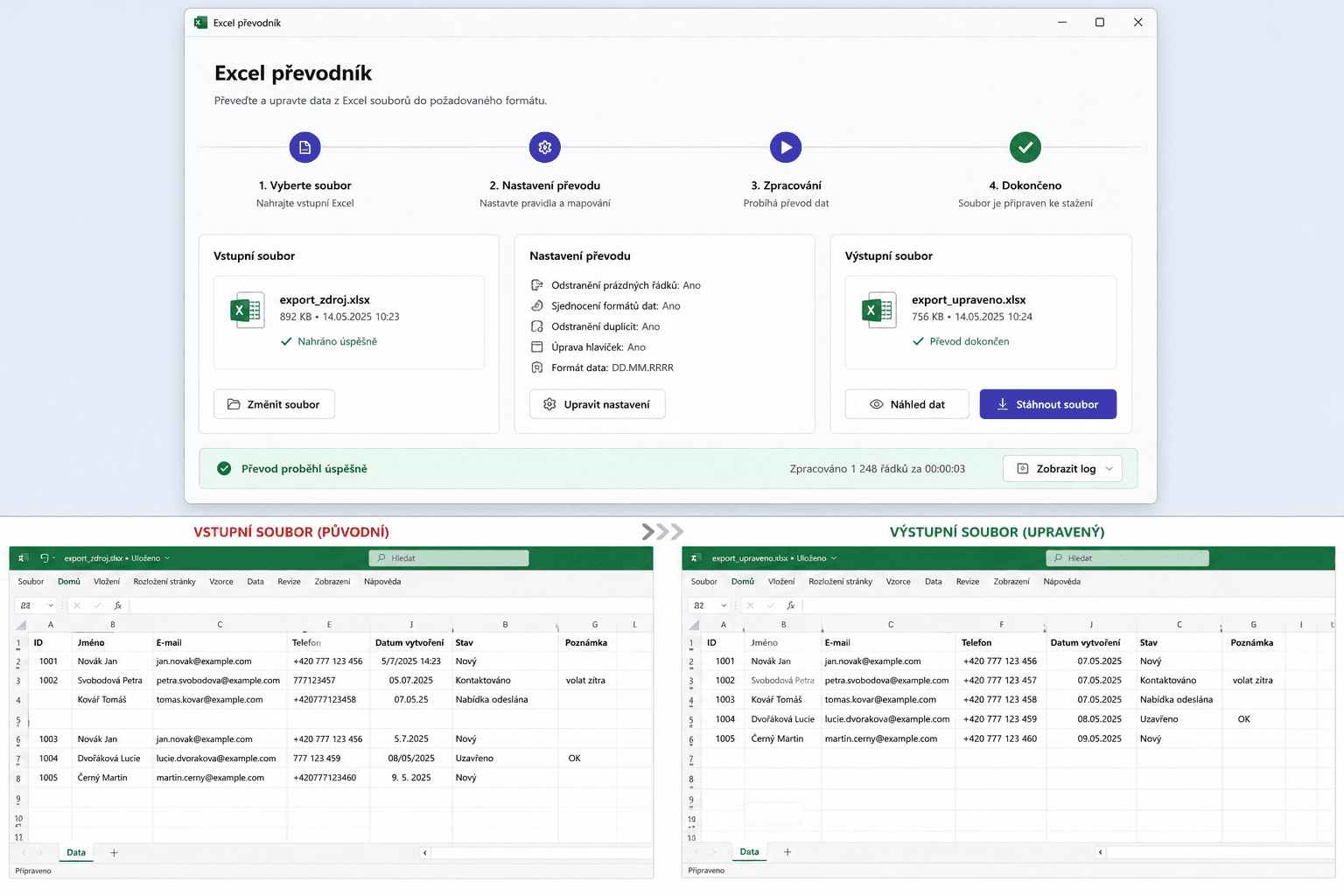
Polish clients sent invoices in Excel. The layout did not match the Premier accounting program — every time, the accountant rearranged columns by hand. We built a simple tool: drag the file onto the desktop icon, and a correctly formatted Excel appears. Done.

Starting point: Column order and table structure from Polish systems did not match Premier's import format. The same manual adjustment every month — time-consuming and error-prone.

What we built: A Power Query transformation script wrapped in a BAT launcher on the desktop. No technical interface opens — just drag and drop.

Outcome: No more manual column rearrangement, lower error risk, output Excel ready for Premier import.

Tools used: Microsoft Excel, Power Query, BAT launcher, Premier

One-off risk screening of business scope across 500+ companies

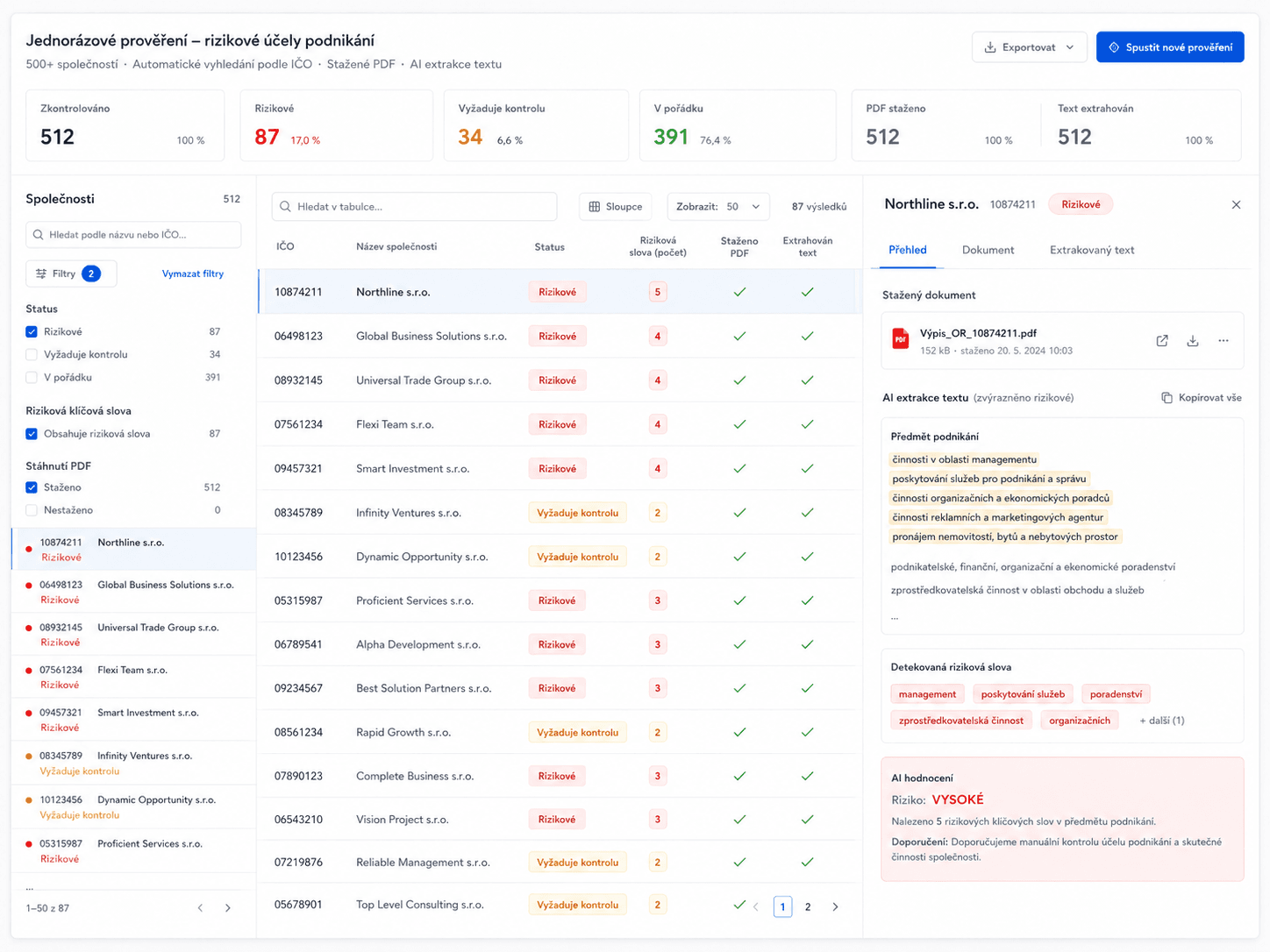
One client had an overly generic business object registered in the commercial register — potentially problematic under case law. The immediate question: how many other clients have the same issue? Manual review of 500+ companies would have taken days. Automation did it in hours.

Starting point: The wording "manufacturing, trade and services not listed in Annexes 1 to 3 of the Trade Licensing Act" can be regarded as indefinite under Supreme Court case law. Reviewing hundreds of companies one by one would be slow and inefficient.

What we built: A Python script downloaded extracts from justice.cz by company ID. AI-assisted processing extracted business objects from PDFs into Excel and flagged companies with the risky wording. Final assessment and client communication stayed with professional judgment.

Outcome: 500+ companies screened without manually opening each extract, a concrete client list for follow-up notices, lower risk of any company being missed.

Tools used: Python, justice.cz, Excel, AI-assisted text processing

Case study 3

Autoskla Trade: from email on one computer to CRM and automated windscreen pricing

Autoskla Trade: from email on one computer to CRM and automated windscreen pricing

Leads arrived by email on one computer. The owner forwarded them to a personal Gmail just to read them on his phone. Pricing one windscreen took 15–30 minutes of manual lookup — and every extra minute reduced the chance of winning the job. Today the company has CRM, unified email, and automation that finds windscreen prices itself.

Starting point

Email via POP3 tied to one computer, replies going from a different address than the company one. No CRM — lead status was guessed from whether an Outlook email was read or unread, creating confusion between the owner and his colleague.

What we built

Step 1 — Microsoft 365: Mailboxes migrated to Exchange. Email accessible from computer, phone, and browser — no forwarding to Gmail.

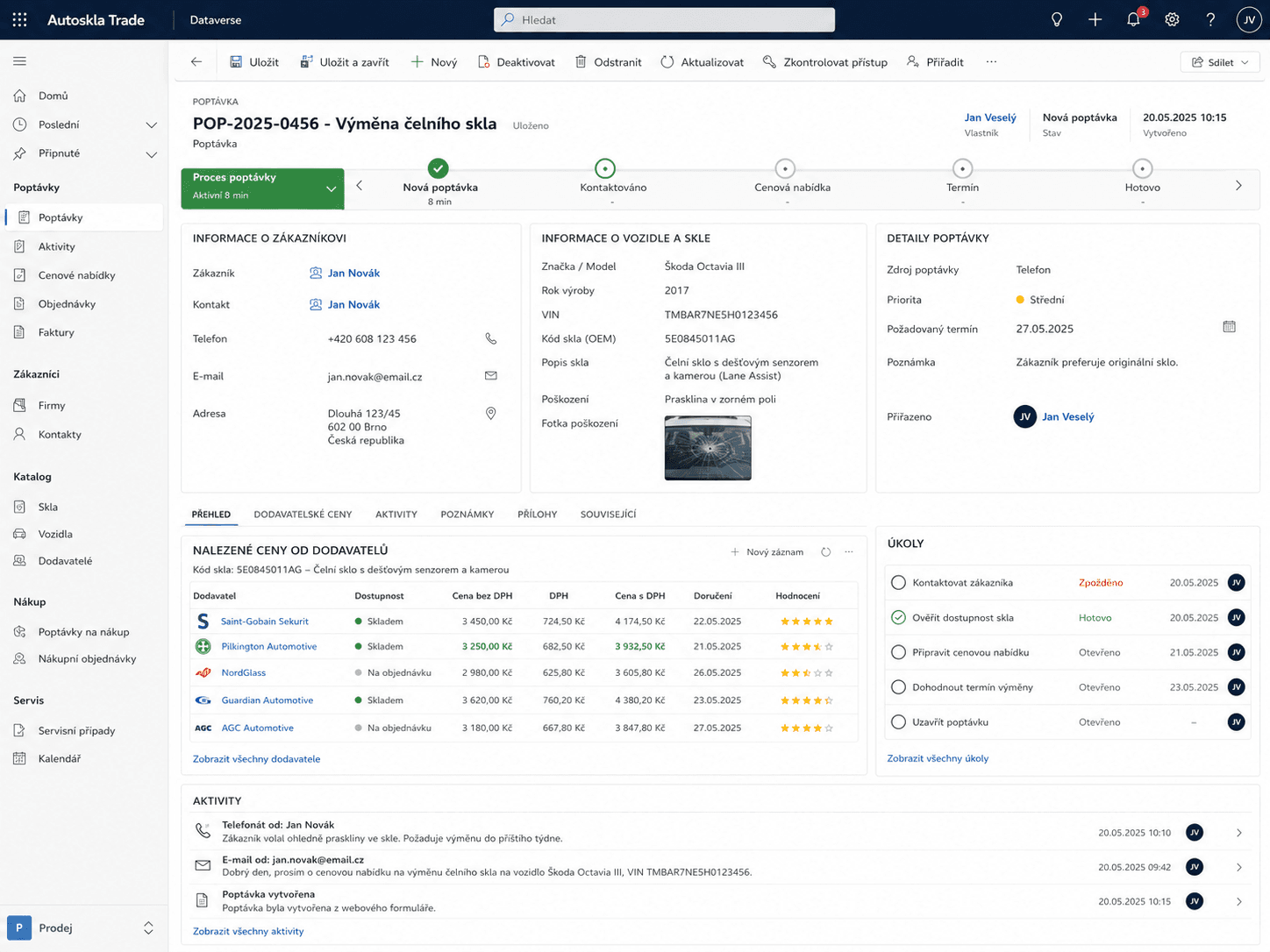
Step 2 — CRM in Microsoft Dataverse: Power Automate automatically creates new leads from the website form. Each job has a clear status: new lead → contacted → quote sent → appointment → completed.

Step 3 — Automated pricing: The owner knew that calling within 30 minutes of an inquiry sharply raises the odds of winning the job. The problem was a slow manual process: VIN → Eurocode → compare prices with suppliers → only then call. We built an agent that takes the VIN from CRM, finds the Eurocode, and checks prices with multiple suppliers. Results flow back directly into the CRM record.

Outcome

  • company email accessible from anywhere, no forwarding
  • clear CRM for all leads and jobs
  • automatic lead creation from the website
  • windscreen pricing without manual lookups
  • faster response to leads, higher chance of winning the job

Tools used: Microsoft 365, Microsoft Exchange, Microsoft Dataverse, model-driven app, Power Automate, automation agent, supplier portals

Find out what is slowing your company down unnecessarily.

In an initial consultation, we review how you operate and propose where it makes sense to start.